
MIDI PADs
to Controll Tracks
A professional tool for Renoise DAW that connects MIDI pads and buttons to your project navigation. It offers instant access to tracks, instruments, and the mix with zero latency and intelligent song structure scanning.
Platform: Renoise 3.x (tested on 3.5.4)
Features: Native Project Controll Tracks, Send Tracks, MIDI Channel, Instruments. Function MUTE, SOLO, Select Track.
1. Main Workflow & GUI
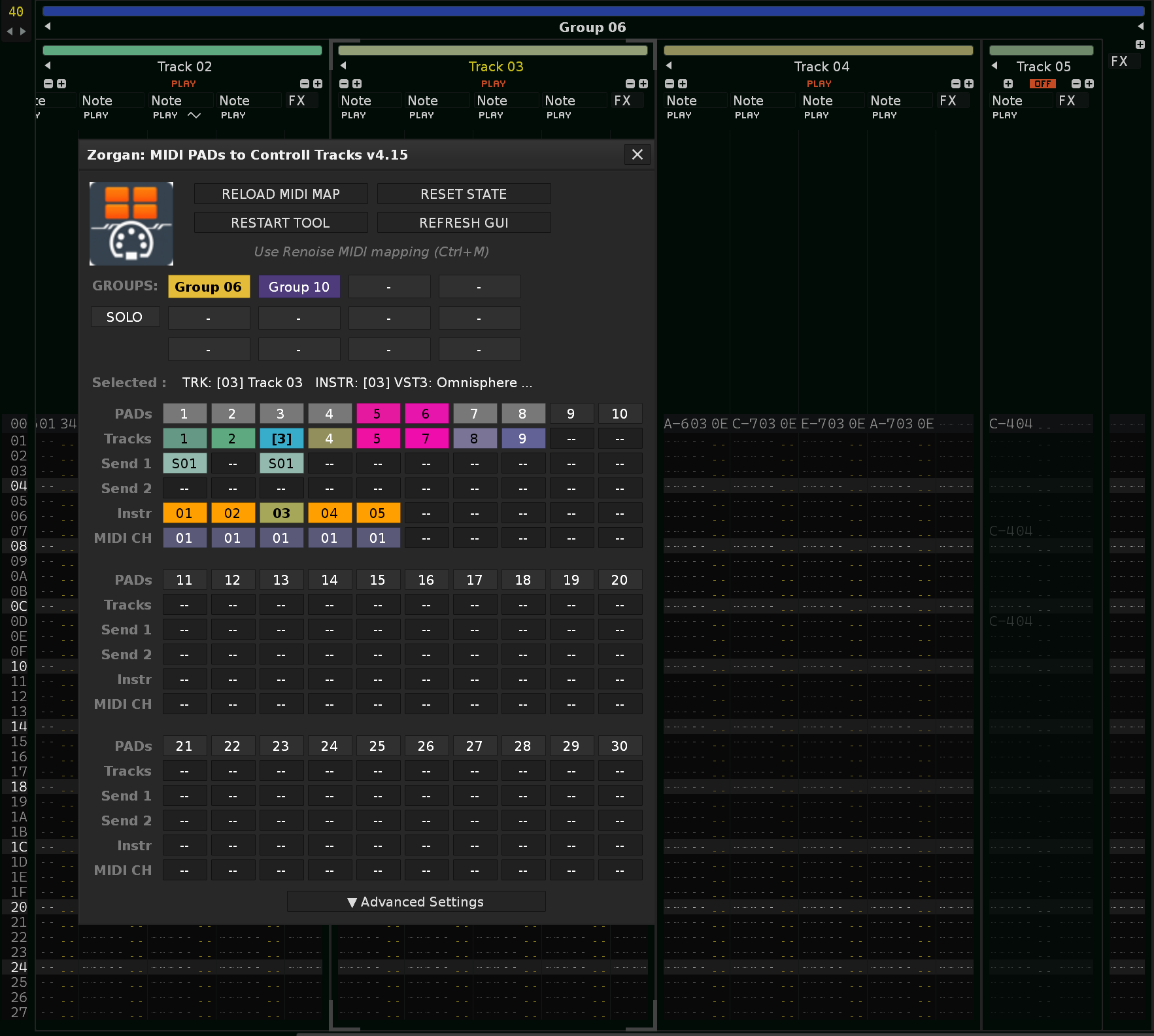
The tool is designed for lightning-fast navigation without the need for a mouse. The GUI serves as an interactive control panel and simultaneously as a real-time visual state monitor for the entire project.
Triple-Logic Mapping
Map your pads via Ctrl+M. A single pad handles three actions: a soft press selects the track/instrument, a harder press toggles MUTE, and a long hold activates SOLO.
Smart Indication
GUI buttons inherit track colors from Renoise. You instantly see which track is selected, which belongs to a Group, and where Sends or Solo states are currently active.
2. Key Features & Engine
Version 4.15 introduces a completely redesigned core that automatically adapts to your project without the need for complex manual configuration.
Native Project Scan
The tool automatically scans patterns and detects assigned instruments and MIDI channels. This completely eliminates the need to set mathematical offsets.
Optimized Performance
An architecture utilizing “Dirty Flags” and “Throttling” ensures that Renoise won’t freeze, even during extremely rapid API state changes.
CC 127 Support
Native support for standard non-dynamic MIDI buttons. A CC value of 127 is automatically interpreted as a strict Select command.
3. Advanced Settings
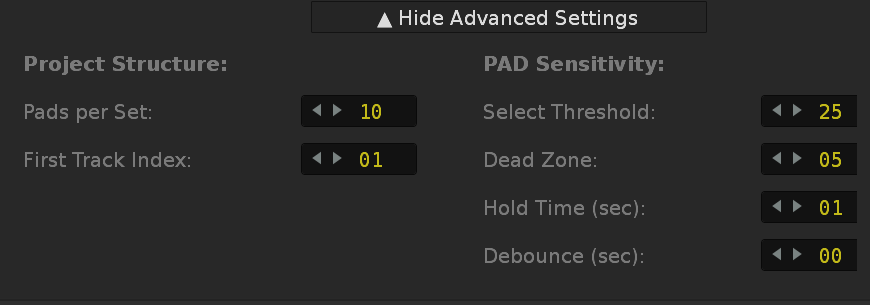
The Advanced Settings section allows precise calibration of the tool for your specific MIDI controller and workflow preferences.
Project Structure
- Pads per Set: The number of pads displayed in one row (typically 8 or 10 depending on your controller).
- First Track Index: The project track from which the tool should start mapping the first pad.
PAD Sensitivity & Timers
- Select Threshold: The velocity limit below which a Select action is triggered. Above this threshold, Mute is activated.
- Dead Zone: The dead zone between Select and Mute actions to eliminate accidental toggling.
- Hold Time: The duration in seconds you must hold the pad to activate the SOLO state.
- Debounce: A time filter to prevent multiple triggers from mechanical button bounces.
4. Changelog
v4.14: Anti-Freeze Architecture (Throttled idle processing, removed heavy rescans)
v4.13: Zero FOUC GUI (Pre-rendered GUI preparation, no layout flashing)
v4.12: Standard MIDI Button Support (CC value 127 = Select command)
v4.10: Smart Instrument & MIDI CH Detection (Native Scan Engine)
v4.05: Smart pattern scrolling (Absolute & Endless encoders support)
v3.9x: Split Solo Architecture (Native separation of Group vs Track Solo logic)