HYDRA SANITY
A production-ready Renoise HYDRA DSP automation cockpit for recording, overwriting, repairing, smoothing, and protecting automation graphs from physical MIDI hardware, Aftertouch, and MCU_COM Panorama OSC workflows. Version v8.61 FINAL adds PLAY-only IRON / Smooth graph processing, refined STICKY / ARM ON / LATCH workflow, clearer Smooth runtime feedback, faster GUI FULL MINI row navigation, and expanded HYDRA DSP OUT 1–9 helper visibility directly inside the GUI.
HYDRA SANITY is not a replacement for Renoise automation. It is a deterministic control layer above HYDRA DSP input. It decides when a controller should prepare, write, hold, safely listen, repair spikes with IRON, smooth the curve with Sm, reconnect through Release Bridge, or hold the last value directly through STICKY. The goal is simple: make the Renoise automation graph behave more like a playable hardware surface while keeping the graph clean, editable, and audio-safe.
Controller / Aftertouch / Panorama encoder / Studio or Travel HW
└─► HYDRA SANITY intent engine
├─► MIDI Learn Auto Detection
├─► HW Profile: STUDIO / TRAVEL
├─► REC / ARM / LATCH / STICKY / LEAVE
├─► stable sparse Write-To-Graph
├─► Interpolation Shelter + Release Bridge
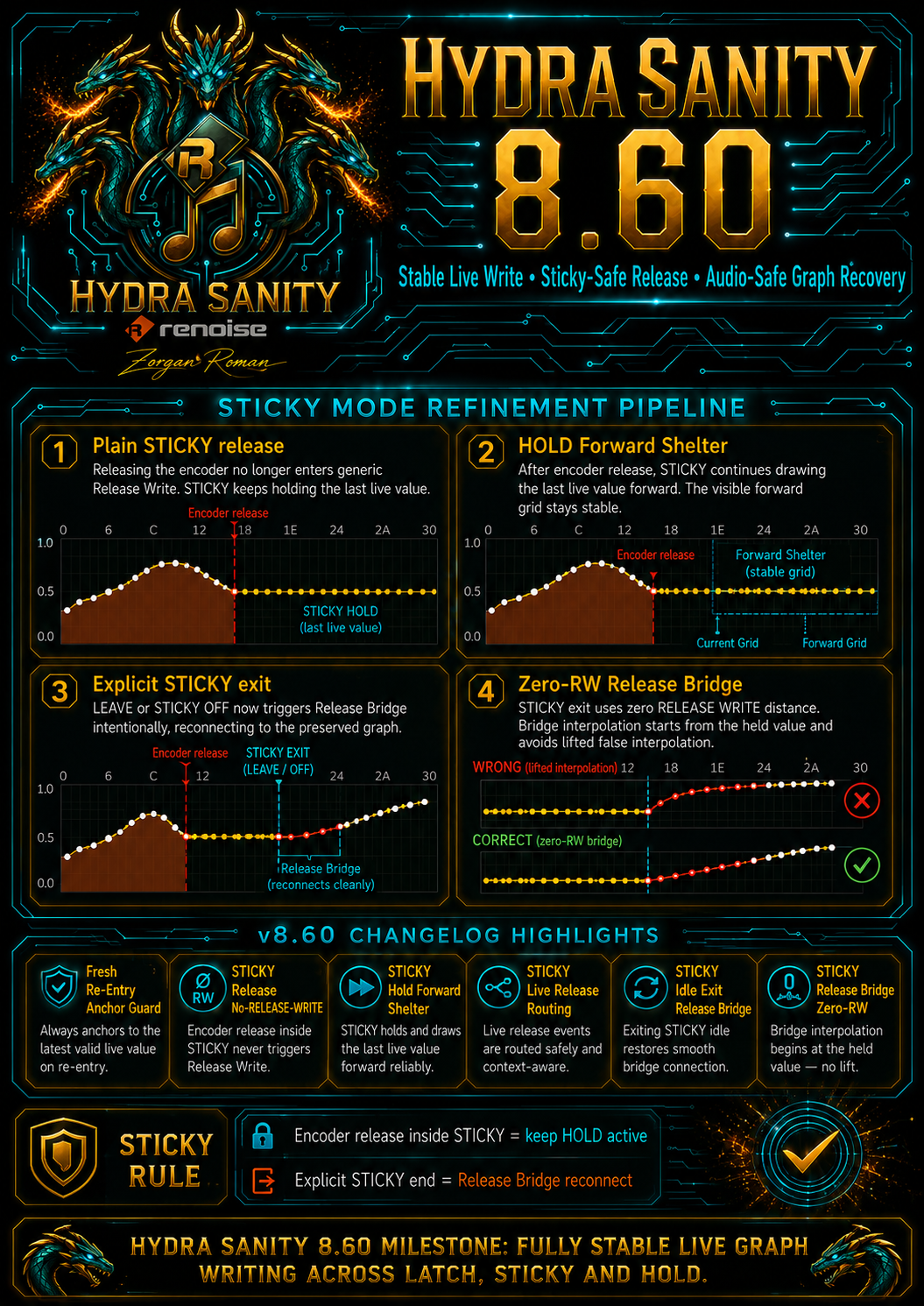
├─► STICKY HOLD forward shelter
├─► explicit STICKY exit bridge reconnect
├─► PLAY-only IRON / Sm graph processing
├─► HYDRA DSP OUT 1–9 helper visibility
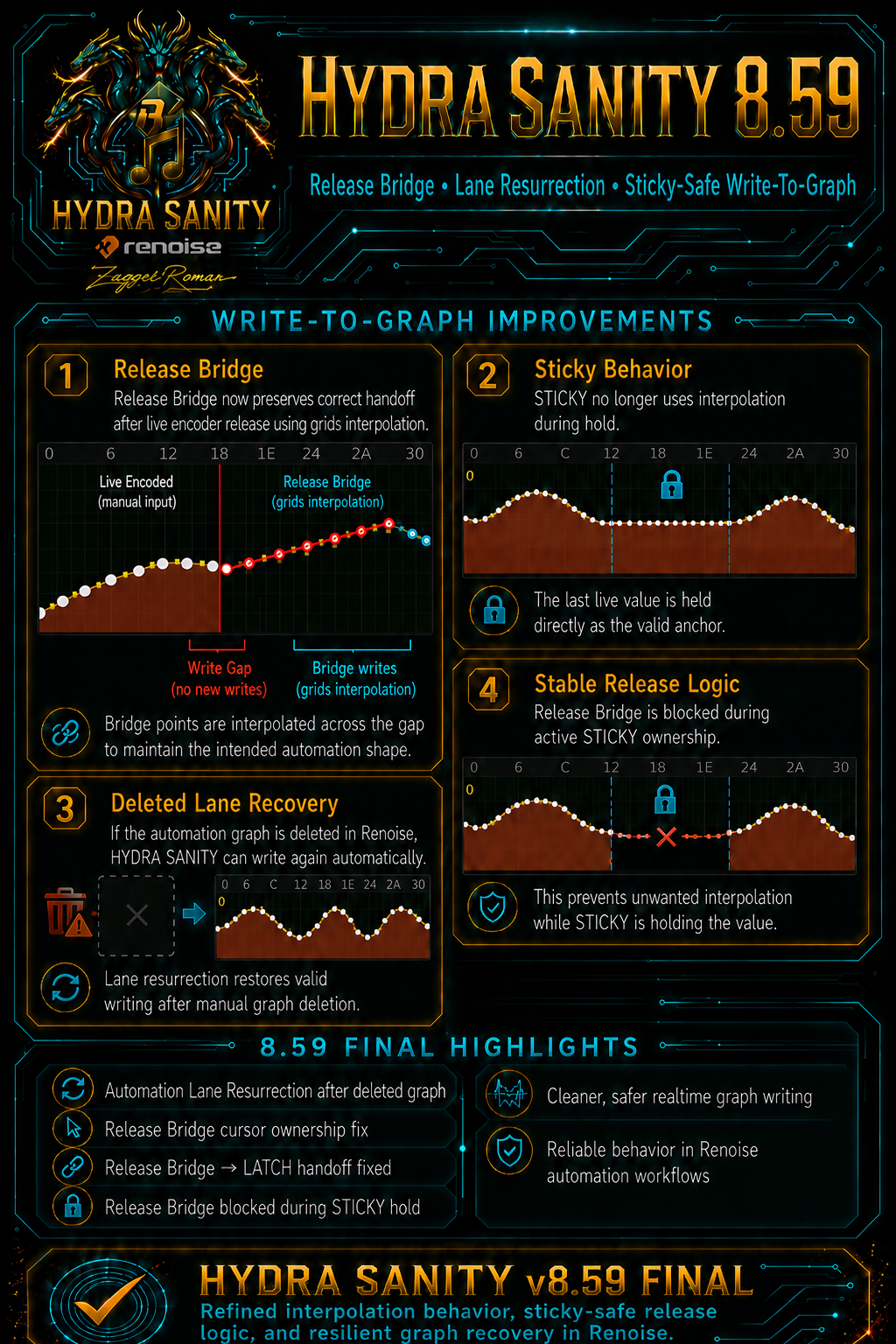
├─► deleted lane recovery in Renoise
├─► IRON spike repair / Sm smooth shaping
└─► targeted MIDI / MCU feedback
opens, follows, validates and protects the correct HYDRA automation graph
REC, ARM, LATCH, STICKY, LEAVE, Touch Punch-In, Safe Listen
writes sparse stable automation even at very high BPM and LPB
IRON repairs spikes; Sm shapes smoother automation curves
Aftertouch and Panorama W.A. can become HYDRA graph input
v8.61 FINAL: smoother graph workflow, PLAY-only IRON/Sm and clearer HYDRA OUT visibility
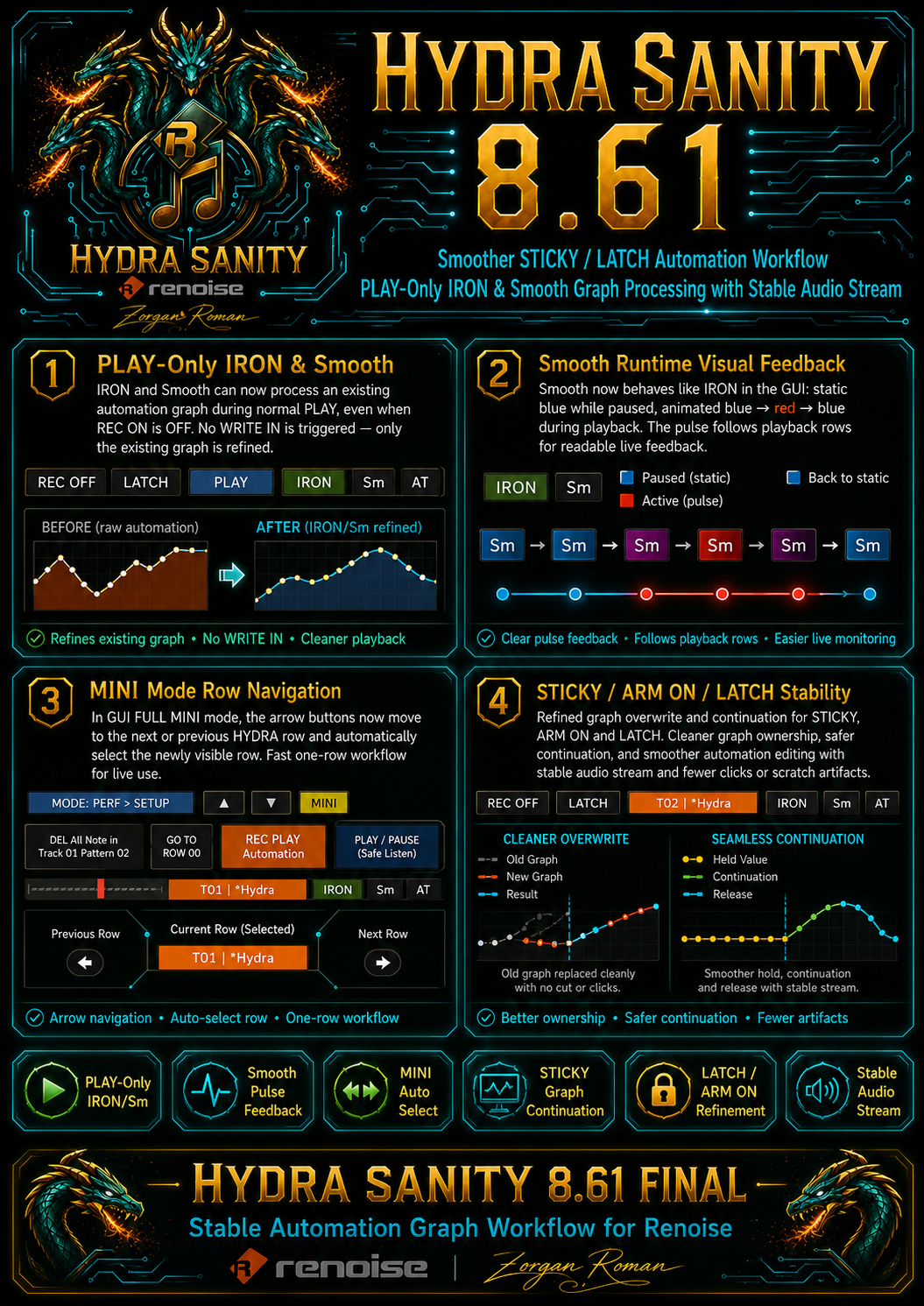
v8.61 FINAL builds on the stable live Write-To-Graph engine and makes day-to-day automation editing more direct. IRON and Smooth can now refine an existing automation graph during normal PLAY even when REC ON is not active. The full WRITE IN workflow stays unchanged when REC ON is enabled, but you can now use IRON / Sm as a safe graph-processing layer for existing automation without triggering new recording.
PLAY-only IRON / Sm
IRON and Smooth can process an existing automation graph during normal playback with REC ON disabled. No WRITE IN is triggered, no Release Bridge path is started, and no new automation lane is created. Only the existing graph is refined.
STICKY / ARM ON / LATCH workflow
The stable STICKY, ARM ON and LATCH behavior remains the core live workflow. HYDRA can overwrite graph ranges cleanly, keep the last live value as a valid anchor, and reconnect safely to preserved graph data when STICKY is explicitly ended.
Smooth button feedback
Sm now behaves visually closer to IRON. When paused it stays as a static active blue state. During playback it uses a row-driven blue → red → blue pulse so you can see when Smooth is actively processing.
GUI FULL MINI navigation
In MINI mode, the ▲ / ▼ buttons now move to the previous or next HYDRA row and automatically select the newly visible row. The visible row and the active row stay aligned for a fast one-row live workflow.
Expanded HYDRA DSP OUT 1–9 helper display
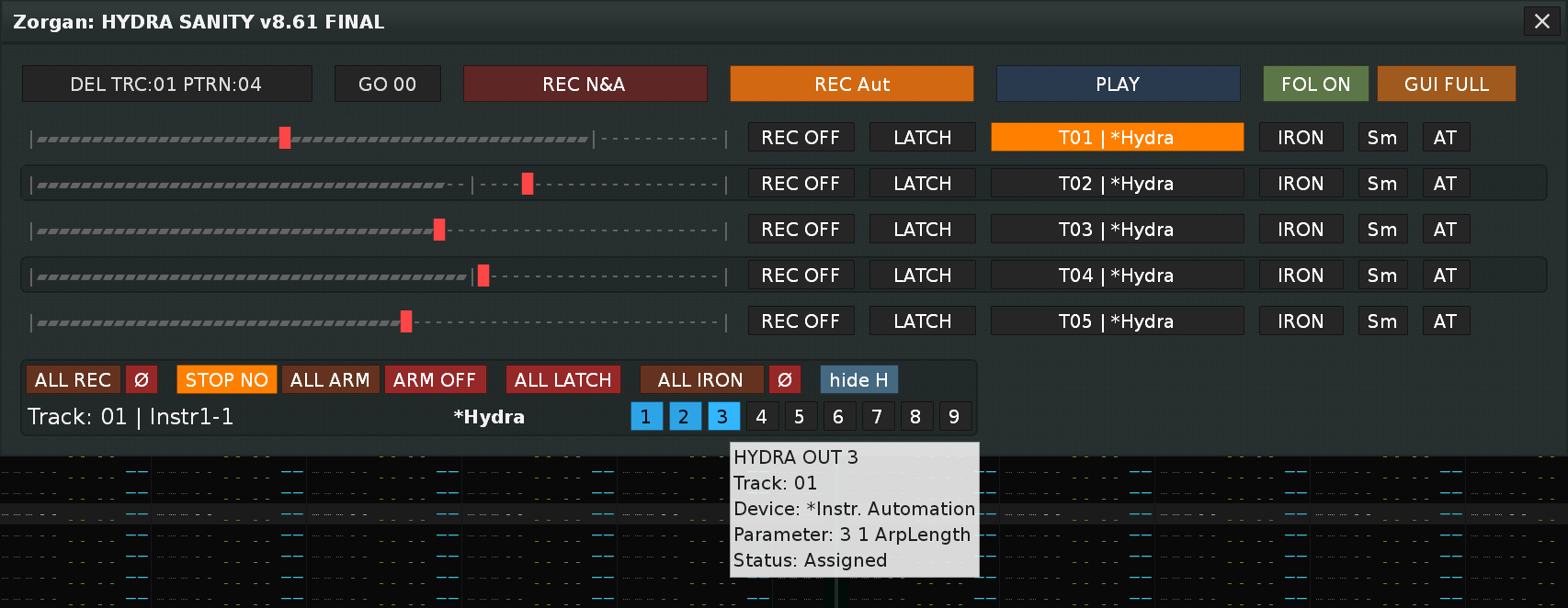
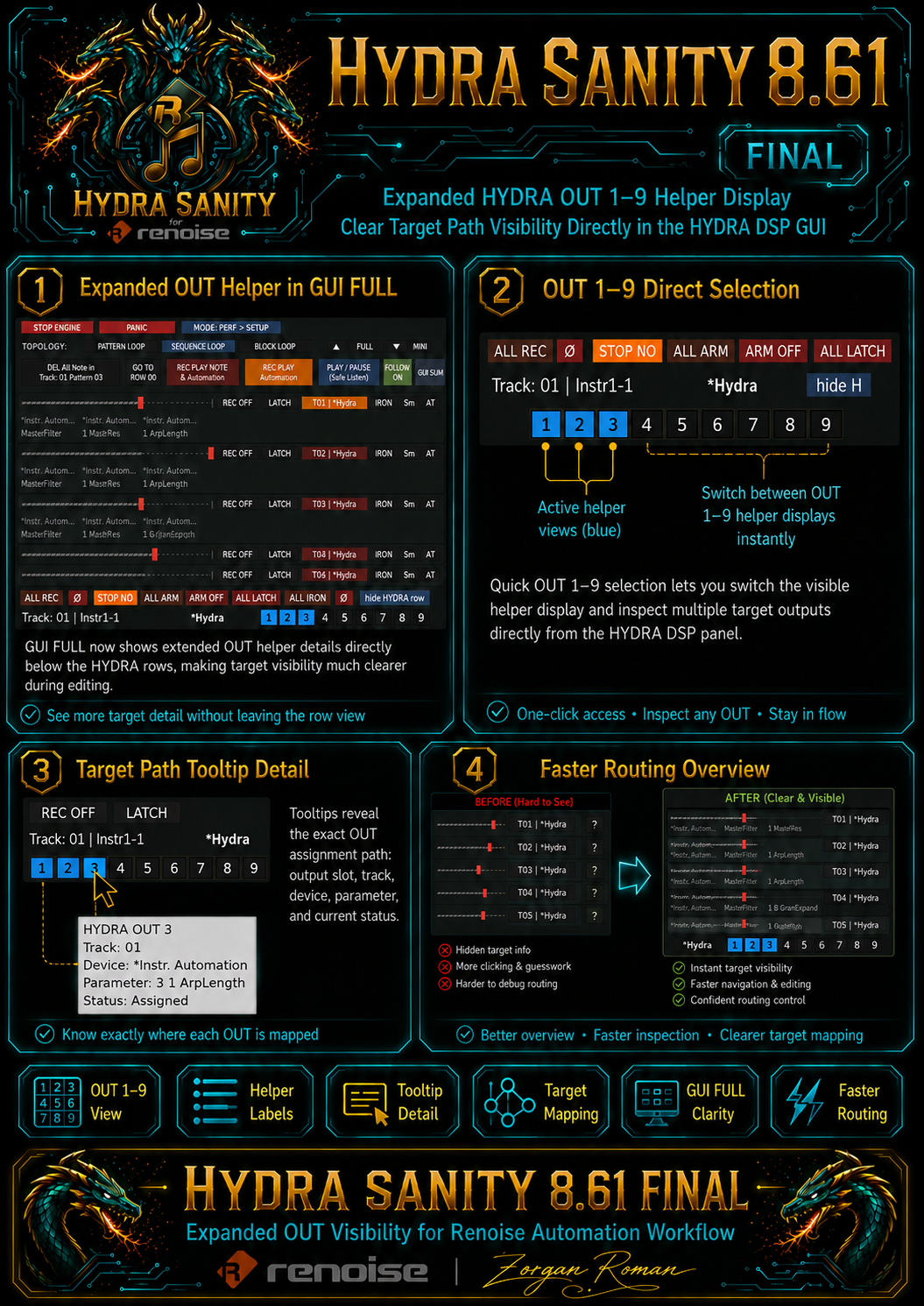
GUI FULL now shows expanded HYDRA OUT helper information directly below the visible HYDRA rows. The OUT 1–9 buttons select which helper group is displayed, and tooltips can reveal the exact OUT assignment path: OUT number, track, device, parameter and status. This makes complex HYDRA DSP routing easier to inspect without leaving the main performance view.
PLAY + IRON / Sm + REC OFF ─► refine existing graph only
REC ON + controller movement ─► full Write-To-Graph workflow
STICKY encoder release ─► keep HOLD active
explicit STICKY exit ─► Release Bridge reconnect
GUI FULL OUT 1–9 buttons ─► inspect HYDRA DSP target helpers
GUI FULL MINI arrows ─► move and auto-select visible HYDRA row
Fast start for Renoise DAW users
1. Prepare Renoise
Add a HYDRA DSP device to the track you want to automate. HYDRA SANITY reads the HYDRA targets and presents them as controllable rows.
Instrument / VST / DSP
└─► HYDRA DSP
└─► HYDRA SANITY row
2. Learn the hardware
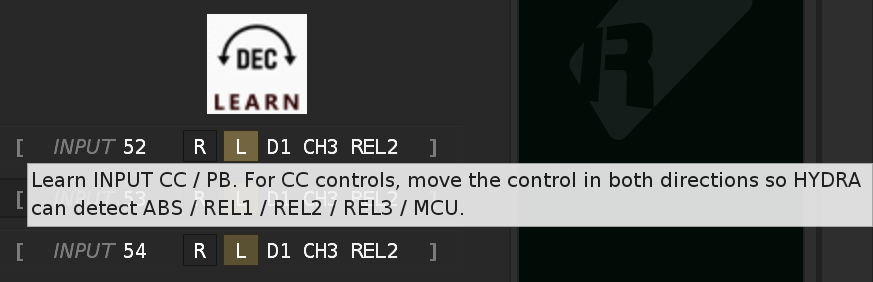
Open SETUP, select your controller in MIDI IN 1, press L on the target row and move the encoder or fader in both directions. HYDRA detects ABS, PB, REL and MCU styles automatically.
D1 CH1 ABS
D1 CH1 REL2
D2 CH1 MCU
3. Record automation
Use REC PLAY Automation for automation-only recording, or REC PLAY NOTE & Automation when you also want to record pattern notes in Renoise Edit Mode.
4. Repair, smooth, hold or reconnect
Use IRON for spike/edge repair, Sm for smoother curve shaping, STICKY to hold the last live value, and LEAVE / STICKY OFF for explicit Release Bridge reconnection.
Prevent duplicate MIDI reactions and pattern FX-column writes
Controller owned by HYDRA SANITY
For controllers assigned to HYDRA SANITY MIDI slots, the cleanest setup is to keep the same physical MIDI input disabled in Renoise Preferences > MIDI. HYDRA SANITY then becomes the only controller filter and automation layer for that hardware.
Shared MIDI input with Renoise
If the same MIDI input must be enabled both in Renoise and in HYDRA SANITY, disable Pitchbend & Controllers in Renoise Preferences > MIDI > Record & Play Filter. This prevents raw encoder/CC streams from being written into the Renoise pattern FX columns.
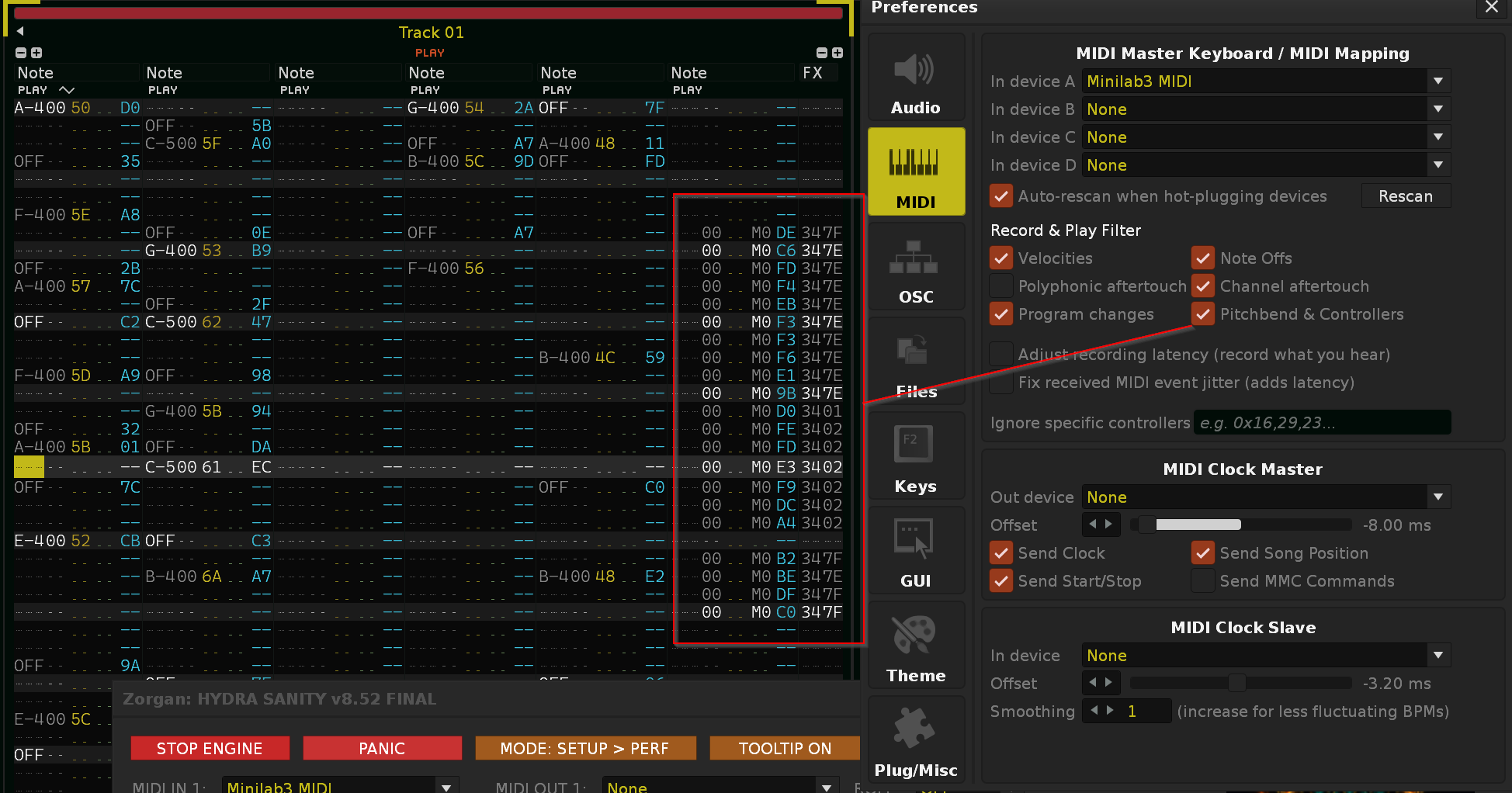
Renoise DAW MIDI IN ─► same controller device allowed
HYDRA SANITY MIDI IN ─► same controller device allowed
Record & Play Filter ─► Pitchbend & Controllers OFF
Result ─► no raw ENC / CC stream in Renoise FX column
The problem HYDRA SANITY solves
Standard automation recording
Raw live automation can become dense, hard to edit, and difficult to overwrite musically. A controller sends many small changes, the graph can fill with redundant points, and the user still has to manage graph focus and recording state manually.
HYDRA SANITY automation layer
HYDRA SANITY treats controller input as performance intent. It waits until the right moment, writes only useful value changes, holds stable values when needed, protects the active graph, and gives visual / LED confirmation of what state the row is actually in.
Recording automation, notes, and safe listening
REC PLAY Automation
Use this mode when you want to write automation without recording pattern notes. Renoise playback runs, HYDRA writes graph movement, and the native note-editing path stays safe.
REC PLAY NOTE & Automation
Use this mode when you want Renoise Edit Mode ON and want to record notes and automation together. If paused, HYDRA can wait for the first real MIDI Note On and then start recording.
PLAY / PAUSE Safe Listen
Use Safe Listen when you want to hear the song without writing new automation. Active recording states are protected so you can test movement without accidentally overwriting the graph.
Instrument-per-track live workflow
If your Renoise project uses Instrument per Track, the track contains its assigned instrument, prepared automation target, and HYDRA DSP. Move the mapped control for the desired HYDRA row and HYDRA SANITY can bring the matching track and instrument into focus. You can immediately record notes and automation, then move another mapped control and continue on another instrument without manual Renoise switching.
REC, ARM, LATCH, STICKY, IRON and Sm
REC ON
The row is allowed to write automation. REC OFF means the row is protected from writing.
ARM ON
Prepare the row. The first real movement activates writing. This is useful for touch punch-in style workflows.
LATCH
Write while touched or moved, then return to the preserved automation graph through the release logic.
STICKY
Hold the last live value as a valid graph anchor. In v8.61, encoder release keeps HOLD active, while explicit STICKY end allows Release Bridge reconnect. IRON / Sm can also process an existing graph during PLAY without REC ON.
IRON
Repair short spikes, graph shots, cliffs and edge artifacts while preserving the intended musical motion.
Sm
Smooth the whole curve when the movement should become softer, more rounded and less stepped.
STOP NO
Prevent automatic STICKY → ARM ON boundary re-prime when looping, wrapping or returning to Row 00.
FOLLOW / GO 00
Keep Renoise following playback, or jump quickly to Row 00 when preparing another take.
Cleaner graph writing with fewer unnecessary points
HYDRA SANITY does not try to write every incoming controller tick as a new automation point. The writer checks value movement, direction, threshold, transport state, recording intent, target validity and active graph ownership. The result is a curve that usually contains fewer points, remains easier to edit, and stays stable even at very high BPM and LPB.
Raw / dense automation
A direct controller recording can behave like a dense stream. Treat this as 100% point pressure. It captures everything, but can create too many small graph points for later editing.
████████████████████ 100%
Plugin / filter smoothing only
A filter or smoothing plugin can make movement softer, but it usually does not solve graph ownership, controller intent, REC/LATCH/STICKY state, hardware feedback, or graph selection workflow.
movement may be smoother,
but the graph workflow is still manual
HYDRA SANITY sparse write
In practical controller work, slow and medium movements often need far fewer points than a raw dense stream. As orientation, a sparse HYDRA pass can commonly behave like roughly 15–35% of raw point pressure for smooth moves and around 35–60% for aggressive moves. Exact results depend on BPM, LPB, controller rate and movement style.
██████░░░░░░░░░░░░░░ 15–35%
████████████░░░░░░░░ 35–60% heavy motion
Interpolation Shelter
During active writing, HYDRA creates a short protected forward shelter so Renoise interpolation is not pulled toward stale nearby graph points.
current live value
└─► protected forward shelter
└─► audio stream stays stable
Release Bridge
After ordinary LATCH-style movement ends, HYDRA can write a short forward Release Bridge toward preserved old graph data. In STICKY, plain encoder release keeps HOLD active; explicit STICKY end creates a zero-RW bridge from the held value.
ordinary release ─► bridge may reconnect
STICKY encoder release ─► keep HOLD active
explicit STICKY end ─► zero-RW bridge reconnect
deleted lane ─► recreate and write again
Where HYDRA SANITY is useful in real Renoise projects
Filter cutoff performance
Map a hardware encoder or fader to a HYDRA controlling filter cutoff. Use ARM ON, start playback, move only when the sweep should begin, and let STICKY hold the final value.
Repair a rough sweep
Use IRON to repair spikes and edge artifacts without destroying the intended motion. Use Sm when the whole curve should become smoother and more rounded.
Aftertouch to VST automation
Expose a VST parameter through Renoise automation, route it through HYDRA, enable AT on the row, and use keyboard pressure as a visible editable automation graph.
Panorama W.A. capture
With MCU_COM Panorama, enable W.A. on ENC1–ENC8. HYDRA receives PANORAMA_E rows through OSC and writes the target automation with the same REC / ARM / LATCH / STICKY logic.
Deleted graph recovery
If the automation graph is manually deleted in Renoise, move the mapped controller again. HYDRA can recreate the automation lane and continue writing.
Safe playback check
Use PLAY / PAUSE Safe Listen to hear existing automation without writing new data. This is useful before committing another live pass.
Pause-ready note recording
Prepare REC PLAY NOTE & Automation while paused, press the first MIDI note when ready, and let HYDRA start notes and automation at the performance moment.
Studio and travel rigs
Keep your main studio mapping and a compact mobile controller mapping in the same song with STUDIO / TRAVEL hardware profiles.
Two-way awareness between HYDRA SANITY and Renoise
Select from HYDRA SANITY
The row graph button can open the corresponding HYDRA automation graph directly. When a controller move belongs to a mapped row, HYDRA SANITY can also bring the correct graph into focus during the relevant recording workflow.
Follow from Renoise
The tool can synchronize its active row from the current Renoise HYDRA selection. This keeps the GUI and Renoise selection connected instead of behaving like two separate worlds.
HYDRA SANITY row button ─► Renoise automation graph
controller movement ─► target graph focus
Renoise HYDRA selection ─► HYDRA SANITY row awareness
Hardware and performance inputs for the HYDRA graph
ENC REL, DEC REL, ENC ABS, fader, Pitch Bend, MIDI CC, Note buttons, Aftertouch and MCU-style feedback are not the final goal. They are input and control methods that allow physical movement to become an editable Renoise HYDRA automation graph.
ENC REL / DEC / MCU
Relative encoder input is detected automatically during INPUT Learn. HYDRA can identify Arturia REL1, REL2, REL3, wide two’s-complement REL2 and MCU sign-magnitude V-Pot movement without asking the user to choose the type manually.
ABS ENC / FAD / Pitch Bend
Absolute sources are detected automatically. HYDRA recognizes normal CC movement as ABS and Pitch Bend as PB, then writes the physical value directly as normalized automation input.
MIDI CC / Note buttons
Button Learn stores device slot, channel, message type, control identity and the actual OFF / ON values. This supports 0/127, 0/64, 64/127 and Note On/Off behavior.
Aftertouch / AT
Channel Pressure and Poly Pressure can drive HYDRA rows directly. This is a practical route for expressive VST automation when pressure should become a visible editable graph.
HYDRA SANITY detects the control type for you
The user no longer has to know whether a controller sends absolute CC, Pitch Bend, Arturia relative data, MCU V-Pot data, or a non-standard button value pair. HYDRA SANITY learns the physical route and stores the detected mode directly inside the row mapping.
One INPUT Learn for ENC / FAD
The fourth row mapping block is a single INPUT Learn. For CC controls, the tool waits for movement in both directions and then classifies the input. Pitch Bend is recognized immediately as PB.
D1 CH1 ABS
D1 CH1 PB
D1 CH1 REL1
D1 CH1 REL2
D1 CH1 REL3
D1 CH1 MCU
Button Learn stores real OFF / ON values
REC, LATCH/STICKY and MUTE/SOLO mappings use button-value detection. HYDRA does not assume that every button is simply 0/127. The learned mapping remembers the real value pair used by the controller.
OFF 0 / ON 127
OFF 0 / ON 64
OFF 64 / ON 127
Note Off / Note On
MIDI value patterns recognized by INPUT Learn
| Detected label | Control type | INC / clockwise values | DEC / counter-clockwise values | Notes |
|---|---|---|---|---|
| ABS | Absolute CC encoder / fader | 0–127 position movement | 0–127 position movement | Written directly as normalized value. |
| PB | Pitch Bend fader / wheel | Pitch Bend message | Pitch Bend message | Detected immediately, no CC classifier needed. |
| REL1 | Arturia Relative 1 | 65–67 | 61–63 | 64 is neutral if received. |
| REL2 | Arturia Relative 2 / two’s complement | 1–3 | 125–127 | Wide variant also supports 1–20 / 108–127. |
| REL3 | Arturia Relative 3 | 17 / 18 | 15 / 14 | 16 is neutral if received. |
| MCU | MCU sign-magnitude V-Pot | 1–63 | 65–127 | Learn uses a guarded range; runtime accepts full MCU range. |
REL1 / REL2 / REL3 / MCU ─► graph linking allowed
ABS / PB ─► graph linking skipped
Reason: ABS and PB already carry an absolute physical value, while REL/MCU only carry movement delta.
Arturia MiniLab 3 / Arturia User mode
Arturia MiniLab 3, and usually other Arturia MIDI keyboards using Arturia MIDI Control Center User Maps, should behave like a regular MIDI controller in User mode, not like an MCU device, when the goal is correct relative encoder operation. The tested working path is User preset / User mode + relative encoder mode DEC REL 2. HYDRA SANITY MIDI Learn detects DEC REL 2 correctly on MiniLab 3.
Renoise MIDI IN ─► Arturia MiniLab 3 / keyboard input
HYDRA SANITY MIDI IN ─► same device slot, for example D1
HYDRA SANITY MIDI OUT ─► OFF / none for pure encoder input
Arturia mode ─► User preset / User mode
Encoder mode ─► Relative DEC REL 2
MCU mode ─► not required
Separate MCU port ─► not required
MIDI OUT rule: for Arturia User-mode encoder input, leave HYDRA SANITY MIDI OUT disabled / unassigned unless you intentionally test standard CC or Note feedback for buttons or LEDs. Do not enable an MCU output path just because the controller is Arturia.
One song, two hardware setups
HYDRA SANITY supports two hardware profiles directly in the MIDI setup workflow. This is useful when the same song is used with a large studio controller at home and a smaller mobile controller on the road.
HW: STUDIO
Use this profile for the main studio rig: Panorama / MCU_COM, X-Touch, a larger fader surface, or a fixed set of MIDI input and output ports.
HW: TRAVEL
Use this profile for a smaller portable controller: Arturia MiniLab, compact keyboard, or lightweight encoder box.
SWAP HW
Use SWAP HW when the currently connected controller was detected, but the stored STUDIO / TRAVEL role should be reversed.
preferences.xml ─► profile-scoped MIDI IN / OUT / ROLE setup
song tool data ─► HS_HW_PROFILE_V1 profile MIDI Learn payloads
runtime MIDI engine ─► still one MIDI Learn + one parser
safe auto-select ─► boot / song load / GUI open / listener start
Important buttons by recording logic
enable recording for a row
recording intent and hold logic
repair spikes or smooth curve motion
Aftertouch as input
prepare all rows for touch activation
cancel waiting ARM states
protect STICKY through boundaries
enable spike repair globally
Setup mode and compact performance mode
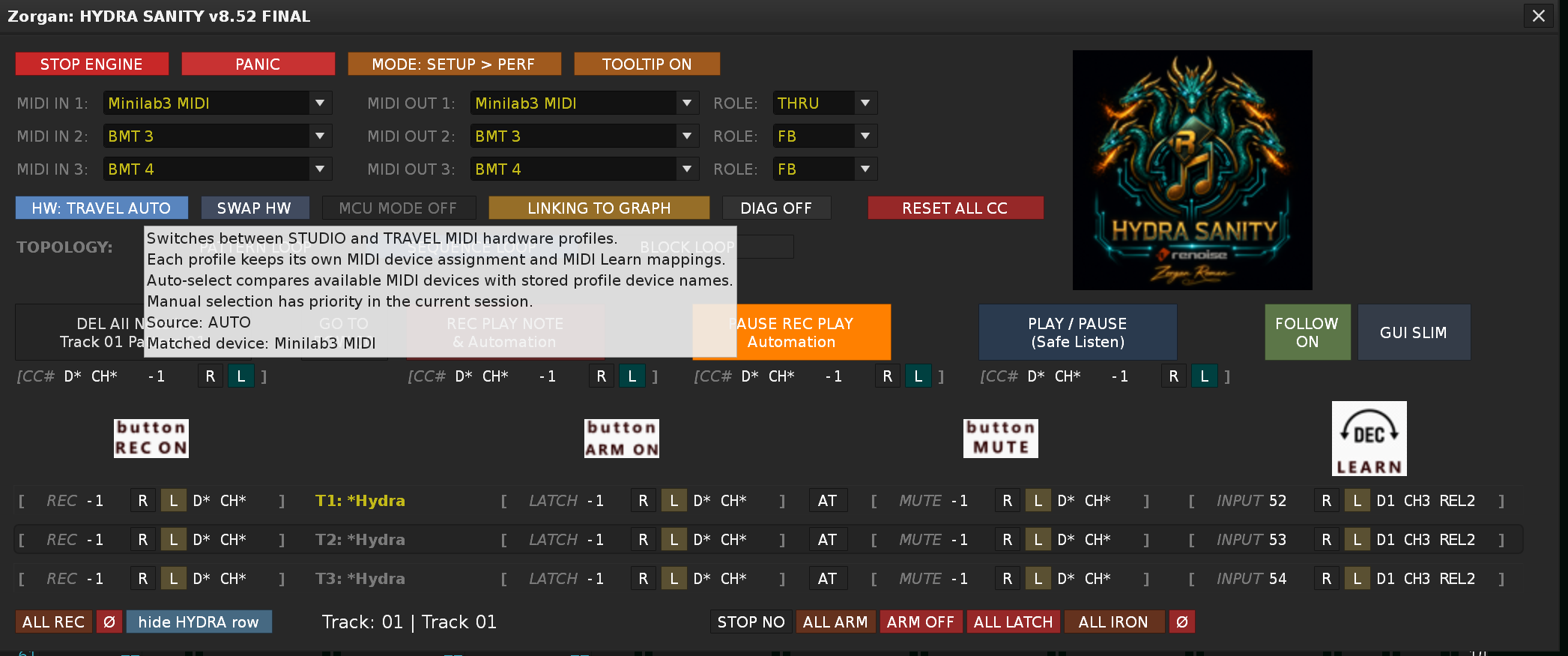
Setup & MIDI Learn Mode
Detailed view for selecting MIDI ports, assigning hardware controls, checking learned device/channel ownership, and preparing HYDRA rows before recording.
Slim Performance Mode
Compact working view focused on recording intent, graph status, controller feedback, and fast access to live automation actions.
MCU_COM / Panorama W.A. workflow
This section is for users running the separate MCU MIDI COM / MCU_COM Panorama tool. MCU_COM owns the Panorama hardware layer. HYDRA SANITY remains the automation engine.
ENC1–ENC8 W.A. PANORAMA_E1–E8 rows
SGA request graph absolute return
ARM / CB flags HYDRA recording intent
LCK protected Panorama row attachment
W.A. encoder capture
Panorama encoders can appear as PANORAMA_E rows inside HYDRA SANITY, using the same recording and graph-writing semantics as normal HYDRA rows.
SGA graph absolute sync
Before the first REL / DEC_REL movement is committed, HYDRA can return the current graph value so the virtual encoder starts from the real automation curve.
Shadow row arbitration
If Panorama and a normal HYDRA row target the same parameter, HYDRA SANITY can hide the duplicate normal row and safely redirect focus to the Panorama row.
Fast fixes for common Renoise workflow issues
Encoder data appears in pattern FX columns
Disable Pitchbend & Controllers in Renoise MIDI Record & Play Filter for the shared MIDI input.
LED feedback does not work
Check that the matching MIDI OUT slot is selected, its ROLE is not OFF, and the learned mapping shows the correct D# CH# route.
Relative encoder starts from wrong value
Use LINKING TO GRAPH only with REL1, REL2, REL3 or MCU. ABS and PB already carry absolute values and ignore graph seeding.
Automation graph was deleted manually
Move the mapped controller again. HYDRA can invalidate the old lane cache, create a new automation lane and continue writing.
STICKY does not draw Release Bridge when I only release the encoder
This is correct current behavior. Plain encoder release inside STICKY keeps HOLD active and continues the forward shelter.
I want STICKY to reconnect to the old graph
Use LEAVE, STICKY button or mapped MIDI button to explicitly end STICKY. That path creates a zero-RW Release Bridge from the held value.
Notes are not recorded
Use REC PLAY NOTE & Automation if you want Renoise Edit Mode ON and note recording active.
Tested hardware, not a limitation
Nektar Panorama T/P
Tested mainly through MCU_COM: W.A. encoders, ARM buttons, LCK, SGA, OSC IPC, display, and LED feedback.
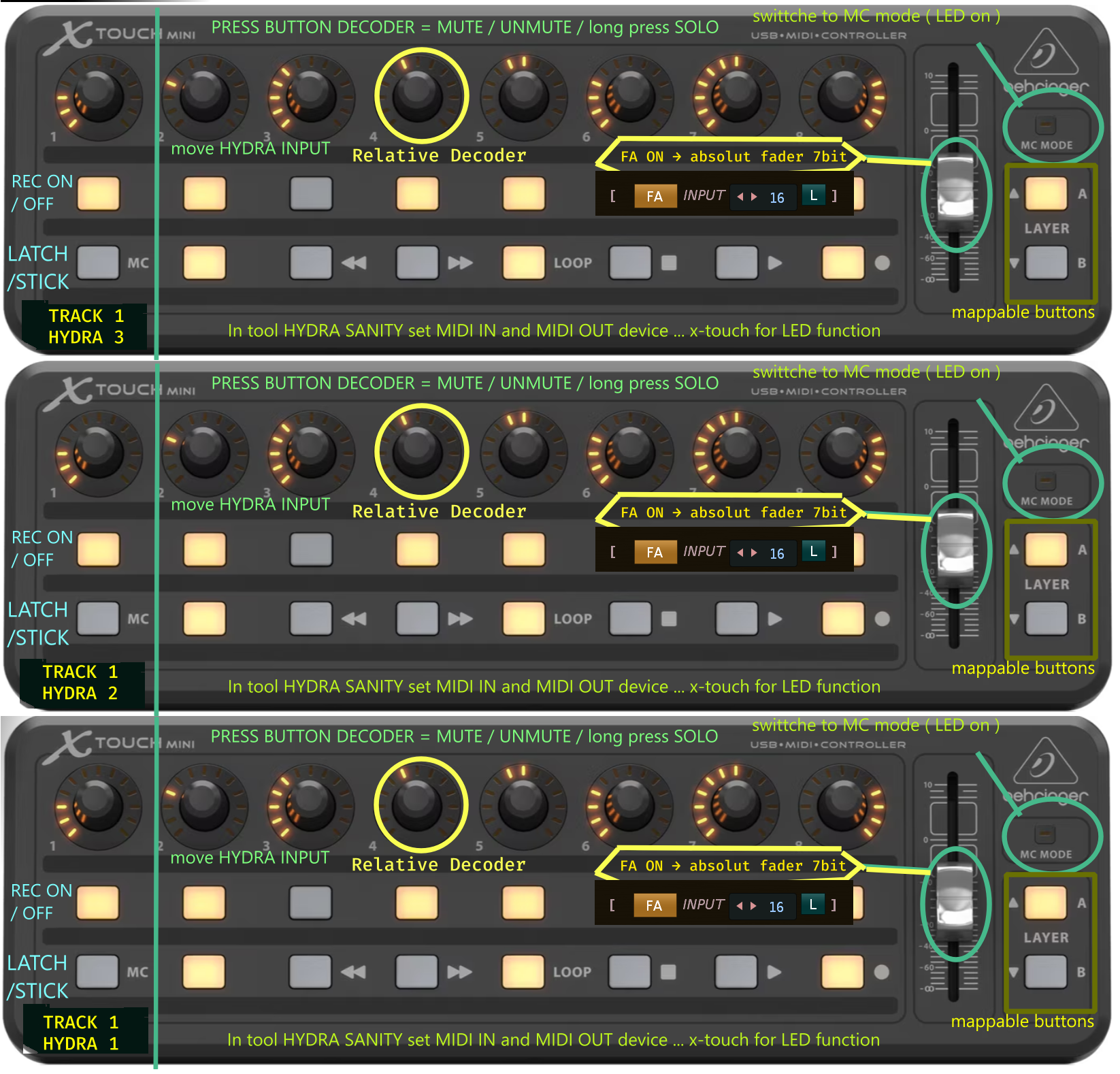
X-Touch Mini / MCU-style
Tested for MCU relative V-Pot data, automatic MCU detection, encoder ring feedback, button LED feedback, and Pitch Bend input.
Arturia relative encoders
v8.50+ detects Arturia REL1, REL2 and REL3 value patterns, including MiniLab 3 User mode DEC REL 2 workflow.
Generic MIDI / virtual ports
Usable with CC, Note, PB, AT, and routed ports. Runtime matching is based on device slot, message type, channel, control identity and learned mode.
v8.61 FINAL visual overview and previous graph-writing milestones
The latest v8.61 update focuses on practical workflow visibility and live graph refinement. The first billboard explains the expanded HYDRA DSP OUT 1–9 helper display. The second billboard summarizes the v8.61 workflow update: PLAY-only IRON / Smooth processing, Smooth pulse feedback, MINI auto-select navigation, and the refined STICKY / ARM ON / LATCH automation workflow. Previous v8.60 and v8.59 milestone billboards remain below as the foundation of the current audio-safe Write-To-Graph engine.
Ready to control the HYDRA automation graph from real hardware?
Use HYDRA SANITY when the automation graph should behave like a playable instrument: record it, overwrite it, hold it, repair it, smooth it, inspect the HYDRA OUT target path, and keep controller feedback readable while the music is running. v8.61 FINAL adds PLAY-only IRON / Sm graph processing, refined STICKY / ARM ON / LATCH workflow, clearer Smooth runtime feedback, GUI FULL MINI auto-select navigation, expanded HYDRA DSP OUT 1–9 helper visibility, and the stable audio-safe graph rewriting foundation from v8.60.